Fix · a drawer that stops short
Drawer won’t close all the way?
Check for an obstruction, incomplete engagement or a fixing in the travel path before replacing the slides. If the drawer opens when you press its front, a small working gap may be intentional. Do not force that gap closed without checking the system.
Check what stops the final movement
Start with what you can see. If this may be a push-to-open drawer, use the gap help within the first check. The Planner will not assume that a visible gap means failed hardware.
The interactive Planner needs JavaScript. The guidance on this page remains available below.
First distinguish a working push gap from a closing fault
A drawer that opens by pressing needs room for its activation movement. A small, even gap with working push-to-open can be normal, especially when it matches the exact system’s specification. If the gap is unchanged but the specification is unavailable, keep that uncertainty explicit rather than inventing a measurement.
A newly enlarged or uneven gap, a drawer that no longer releases when pressed, or a gap that conflicts with the specified setup needs further checking. There is no single correct gap for every drawer. Blum’s TIP-ON BLUMOTION for MOVENTO assembly guidance, for example, documents a front gap and its adjustment for that system. Use the opening and closing behavior guide to distinguish pushing to open, self-closing and soft-closing.
Inspect the path and how the drawer is seated
- Clear accessible interference. Check for an item behind the box, contents catching above it or a loose object in the closing path. Remove it without forcing the mechanism, then test again.
- Check engagement after removal or installation. Confirm that the drawer is attached as its system requires, on both sides where applicable. If you need access, use the removal guide and the matching reinsertion instructions. Do not push past an engaged lock or stop.
- Look for a projecting fixing. A screw head or other fixing must not intrude into the running path. Correct it using the specified screw and fixing arrangement. Removing a required fastener and leaving it out is not a completed repair.
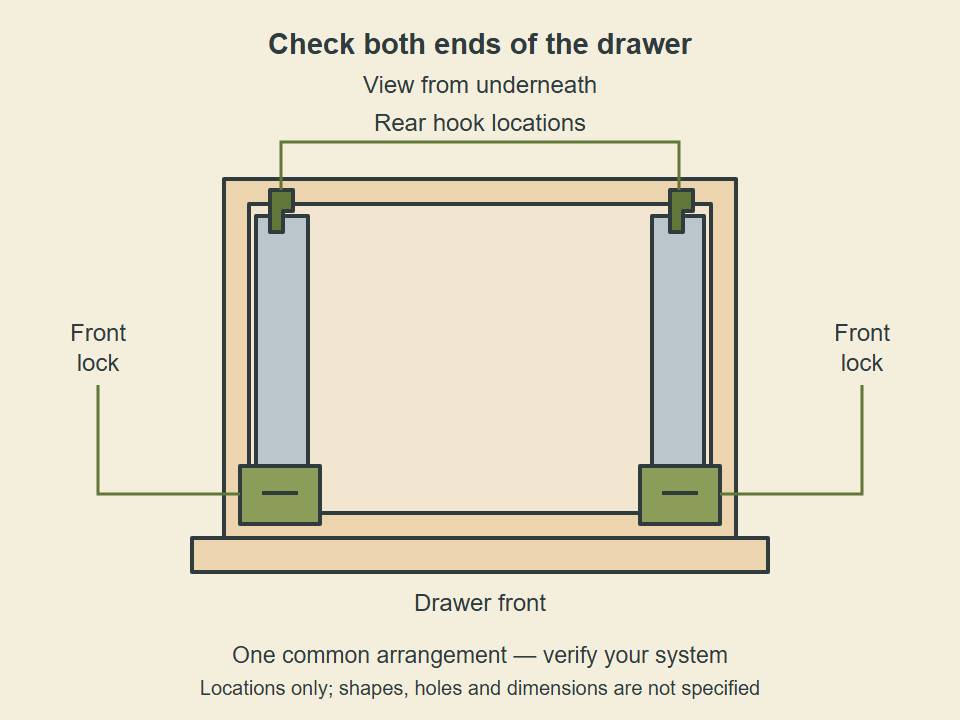
For example, TANDEM 563H/563. instructions specify engagement and removal through their locking devices. Side-mounted disconnect rails and roller slides use other arrangements. Correct seating must be checked against the hardware you actually have.
Use the remaining symptom to choose the next action
- The drawer sits crooked or rubs on one side
- Follow the alignment and adjustment checks. Check the box, mounting surfaces and runner support before adjusting the visible front.
- A closing or push-to-open function used to work and now fails
- Continue the Planner to identify the failed function. A separate damper or latch and a mechanism built into the runners need different checks; a motion problem does not automatically require replacing the whole drawer system.
- A small component is visibly broken
- Check for a matching repair component while confirming that the main running hardware remains serviceable. Use the replacement guide to separate a component repair from complete running-hardware replacement.
- The main running mechanism is bent or broken
- Identify the hardware before ordering. Keep a manufacturer-specific drawer within its supported system, and verify the fit and functions of any proposed replacement.
- You cannot see enough to tell
- Keep the next step as inspection or matching access instructions. Unknown engagement, screw clearance or hardware condition is not evidence that new slides will solve the problem.
Recheck after each correction
With the drawer engaged and all required fixings secure, test its intended travel without the contents. Check both the final closed position and any opening or closing function. Stop if it jams again. If it binds throughout its travel, use the sticking and grinding checks to investigate the broader movement problem.